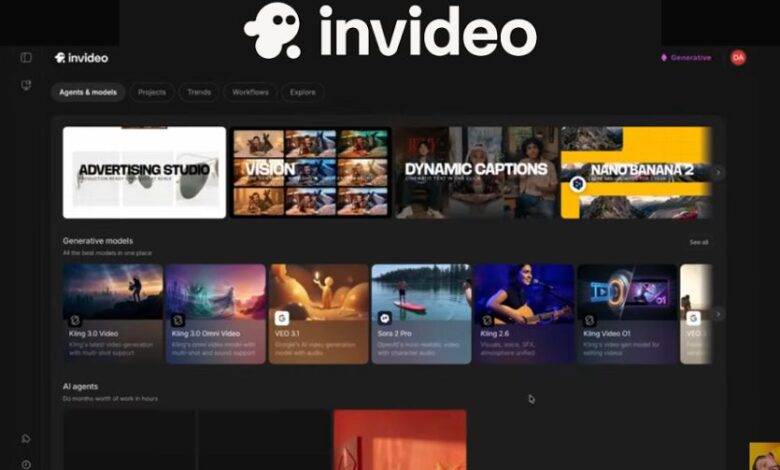
Creating high-quality videos once demanded expensive software, advanced editing skills, and countless hours spent cutting clips, adjusting transitions, recording voiceovers, and fine-tuning every detail. Artificial intelligence has dramatically changed that process. Today, anyone with an idea can transform a simple text prompt into a polished video within minutes. Among the platforms leading this transformation, InVideo AI has become one of the most popular choices for creators, marketers, educators, entrepreneurs, and businesses looking to produce engaging content without the steep learning curve of traditional editing software.
The rise of short-form video content across YouTube, Instagram Reels, TikTok, LinkedIn, and Facebook has increased the demand for faster and smarter production tools. Rather than manually assembling every scene, creators now expect AI to generate scripts, find suitable visuals, add background music, create realistic voiceovers, and even make edits through natural language commands. InVideo AI brings all these capabilities together in a single platform, making professional video creation accessible to users of every experience level.
What Is InVideo AI?
InVideo AI is an artificial intelligence-powered video generation platform that converts written prompts into fully edited videos. Instead of working with a traditional editing timeline from the beginning, users simply describe the type of video they want to create. The AI then produces a complete draft that includes a script, visual scenes, AI narration, subtitles, transitions, background music, and relevant stock footage.
Unlike conventional video editors that require manual editing of every clip, InVideo AI automates much of the creative workflow. Users can continue refining their projects by typing additional instructions such as changing the narration style, replacing footage, shortening scenes, or adjusting the video’s tone.
This prompt-based workflow has made InVideo AI especially appealing to creators who need to publish content consistently without spending hours editing each project.
Why InVideo AI Has Become So Popular
Video marketing has evolved from being an optional strategy into an essential part of online communication. Businesses use videos to promote products, explain services, educate customers, and strengthen brand awareness. Individual creators rely on videos to grow YouTube channels, build personal brands, and increase engagement across multiple social media platforms.
Traditional editing software often presents a steep learning curve, requiring users to understand timelines, keyframes, transitions, color correction, audio mixing, and export settings. These technical requirements can discourage beginners and slow down experienced professionals working under tight deadlines.
InVideo AI removes many of these barriers by allowing users to focus on ideas rather than editing techniques. Instead of learning complex software, creators simply explain what they want, and the AI handles much of the production process automatically. This significant reduction in production time has contributed to the platform’s growing popularity among freelancers, agencies, startups, educators, and digital marketers.
How InVideo AI Works
The process begins with a simple prompt describing the desired video. A user might request a five-minute educational video explaining renewable energy, a product advertisement for an online store, or a motivational YouTube Short.
Once the prompt is submitted, the AI analyzes the request and generates a structured script that matches the topic. It then searches its media libraries for appropriate stock footage, images, animations, and background visuals. At the same time, it produces AI-generated narration using natural-sounding voices and synchronizes subtitles with the spoken dialogue.
Background music and scene transitions are automatically selected to match the overall mood of the video. After the first draft is complete, users can continue making improvements by giving additional text instructions instead of manually editing clips on a timeline.
This conversational editing process significantly reduces production time while allowing creators to maintain creative control over the final result.
AI-Powered Script Generation
One of InVideo AI’s strongest features is its ability to generate complete video scripts based on simple instructions. Many creators struggle with writer’s block or spend hours preparing scripts before recording. InVideo AI helps overcome this challenge by automatically organizing information into a logical sequence.
The AI considers the video’s purpose, audience, tone, and length while generating the script. Educational videos often receive a structured, informative format, while marketing videos emphasize persuasive messaging and product benefits. Storytelling videos are designed with engaging introductions and smooth narrative flow.
Although users can edit every section manually, the AI-generated script provides an excellent starting point that saves considerable planning time.
Intelligent Scene Creation
After generating the script, InVideo AI divides the content into individual scenes. Each section receives appropriate visuals that align with the narration.
Instead of requiring users to search through thousands of stock videos themselves, the platform automatically matches relevant media to the spoken content. If a scene discusses technology, the AI selects modern digital visuals. If the topic involves travel, suitable landscape footage or city scenes are inserted automatically.
This intelligent scene generation creates a cohesive viewing experience while reducing the amount of manual work typically involved in video production.
Extensive Stock Media Library
Finding high-quality visuals is often one of the most time-consuming aspects of creating professional videos. InVideo AI addresses this challenge by providing access to a vast collection of licensed stock footage, images, animations, and graphics.
The integrated media library allows creators to produce professional-looking videos without purchasing separate stock subscriptions or searching multiple websites for suitable assets.
Because the media is already integrated into the editing environment, users can quickly replace scenes or request alternative visuals whenever necessary.
Natural AI Voiceovers
Voice narration plays an important role in maintaining audience engagement. Hiring professional voice artists can be expensive, while recording narration personally requires quality microphones, quiet environments, and post-production editing.
InVideo AI includes a variety of AI-generated voices that sound increasingly natural and expressive. Users can select male or female narrators, different accents, speaking styles, and emotional tones that best fit their content.
Whether producing educational tutorials, product demonstrations, business presentations, motivational videos, or news-style content, creators can choose narration styles that enhance the overall viewing experience.
The AI automatically synchronizes voiceovers with subtitles and scene timing, eliminating another major production step.
Prompt-Based Editing Instead of Traditional Timelines
Perhaps the most distinctive feature of InVideo AI is its conversational editing system. Rather than manually dragging clips across complicated editing timelines, users simply type instructions describing the changes they want.
For example, a creator may ask the AI to shorten an introduction, replace background music with something more energetic, switch the narrator’s voice, modify subtitles, or change the video’s tone from formal to conversational.
The AI processes these requests and updates the project accordingly, making revisions much faster than traditional editing methods.
This approach is particularly valuable for beginners who may not have prior experience with professional editing software.
Automatic Captions and Subtitles
Captions have become essential for online video because many viewers watch content without enabling sound. Subtitles also improve accessibility and help audiences follow spoken content more easily.
InVideo AI automatically generates synchronized captions while allowing users to customize font styles, colors, positioning, and animations. These subtitles improve viewer retention while making videos more suitable for social media platforms where silent autoplay is common.
Automatic subtitle generation also saves creators from manually transcribing lengthy videos.
Multiple Video Formats for Different Platforms
Modern content creators rarely publish videos on only one platform. A single piece of content may be shared on YouTube, Instagram Reels, TikTok, Facebook, LinkedIn, and YouTube Shorts.
Each platform has different aspect ratio requirements, making manual resizing a repetitive task.
InVideo AI simplifies this process by supporting multiple video formats and allowing creators to generate content optimized for various platforms. Vertical videos work well for mobile-first platforms, while landscape formats remain ideal for YouTube and presentations.
This flexibility enables creators to maximize the value of every project by reaching audiences across multiple channels without rebuilding videos from scratch.
AI-Powered Visual Enhancements
Beyond generating scripts and selecting footage, InVideo AI also enhances videos with automatic transitions, animated text, visual effects, and background music that match the video’s style.
These enhancements contribute to a polished final product while maintaining consistency across every scene. Because the AI selects effects intelligently, users spend less time making individual design decisions and more time refining the overall message.
The result is content that appears professionally produced even when created by individuals with little or no prior editing experience.
Designed for Both Beginners and Professionals
One reason InVideo AI appeals to such a broad audience is its balance between simplicity and flexibility. Beginners appreciate the platform’s automation, while experienced creators value the ability to customize nearly every element of the generated video.
Marketing agencies can rapidly produce client content, educators can create engaging learning materials, businesses can generate promotional videos, and YouTubers can publish content more consistently without sacrificing quality.
Rather than replacing creativity, the platform serves as an intelligent assistant that accelerates production while leaving important creative decisions in the hands of the user.
InVideo AI Pricing and Plans
One of the reasons InVideo AI appeals to a wide range of users is its flexible pricing structure. The platform offers a free plan that allows newcomers to explore its AI-powered capabilities without making an immediate financial commitment. This is especially useful for students, hobbyists, and content creators who want to understand how AI video generation works before upgrading.
The free version provides access to AI video generation with a limited number of credits that refresh periodically. Users can experiment with prompt-based video creation, AI narration, subtitles, and basic editing tools while becoming familiar with the interface.
For creators producing content regularly, paid plans unlock significantly more AI credits, faster video generation, premium stock footage, advanced AI models, higher export limits, and additional customization options. Since AI video creation requires substantial computing resources, the platform uses a credit-based system where different actions consume varying amounts of credits depending on video length, quality, and the AI model selected.
Businesses and agencies with higher production demands can also choose enterprise-level solutions that provide greater scalability, enhanced collaboration features, and priority access to advanced AI capabilities.
Who Should Use InVideo AI?
One of the greatest strengths of InVideo AI is its versatility. Rather than targeting only professional video editors, the platform serves users across numerous industries and experience levels.
YouTube creators can use InVideo AI to produce educational videos, tutorials, documentary-style content, motivational videos, technology explainers, finance content, travel guides, and faceless YouTube channels. Since the AI generates scripts, visuals, narration, and subtitles automatically, creators can publish videos more consistently while reducing production time.
Digital marketers benefit from creating promotional videos, product advertisements, lead generation campaigns, and social media marketing content. Instead of outsourcing expensive video production, marketing teams can quickly transform campaign ideas into engaging visual content.
Businesses use InVideo AI to explain products and services, create onboarding videos, introduce company updates, produce customer testimonials, and build brand awareness across digital platforms. Even small businesses with limited budgets can produce professional-quality marketing videos that compete with larger organizations.
Educators and online course creators also find tremendous value in AI-powered video generation. Lessons, presentations, training materials, and educational explainers become far more engaging when accompanied by narration, animations, and relevant visuals generated automatically.
Bloggers can repurpose written articles into videos, helping them reach audiences that prefer visual content. This strategy not only increases engagement but also expands traffic opportunities across YouTube and social media.
InVideo AI for Social Media Content
Social media algorithms increasingly prioritize video content over static images and text posts. Platforms such as Instagram, TikTok, Facebook, LinkedIn, Pinterest, and YouTube Shorts reward consistent publishing and viewer engagement.
InVideo AI simplifies the production of platform-specific videos by automatically generating content in multiple aspect ratios. A single prompt can become a vertical video for Instagram Reels, a landscape video for YouTube, or a square format suitable for Facebook and LinkedIn.
This flexibility saves creators countless hours that would otherwise be spent manually resizing and re-editing projects for different platforms.
The platform also supports captions, animated text, transitions, and royalty-free music, helping creators produce content that feels native to each social media platform while maintaining professional quality.
Benefits for Businesses and Marketing Teams
Video has become one of the most effective digital marketing tools because it captures attention quickly and communicates information more effectively than text alone.
Businesses use InVideo AI to create product demonstrations, promotional campaigns, customer success stories, event announcements, company introductions, and explainer videos. These videos help increase customer engagement while improving conversion rates on websites and social media platforms.
Marketing teams appreciate the speed with which campaigns can be produced. Rather than waiting days or weeks for traditional production workflows, AI-generated videos can often be created, reviewed, and published within hours.
The platform also enables rapid experimentation. Businesses can test multiple versions of advertisements, different voiceovers, alternative scripts, or varying visual styles without repeating the entire editing process.
Advantages of InVideo AI
One of the biggest advantages of InVideo AI is its exceptional ease of use. Even individuals with no prior editing experience can produce polished videos simply by describing their ideas in plain language.
The platform significantly reduces production time by automating scripting, scene creation, narration, subtitle generation, and media selection. This efficiency allows creators to focus more on creativity and content strategy rather than technical editing.
Its extensive library of licensed stock footage provides users with immediate access to professional visuals without requiring separate subscriptions. The AI voiceovers continue to improve in realism, making them suitable for educational, marketing, and business videos.
Prompt-based editing is another standout feature. Instead of navigating complicated editing timelines, creators can simply instruct the AI to make changes using conversational commands.
Support for multiple social media formats further increases efficiency by allowing creators to repurpose one project across numerous platforms with minimal effort.
Limitations to Consider
Despite its impressive capabilities, InVideo AI is not a complete replacement for professional editing software in every scenario.
Highly customized cinematic productions, feature films, complex visual effects, and advanced motion graphics may still require traditional editing applications such as Adobe Premiere Pro, DaVinci Resolve, or Final Cut Pro.
The quality of AI-generated videos also depends heavily on the prompts provided. Clear and detailed instructions generally produce better results than vague requests. Users may occasionally need to refine prompts or make manual adjustments to achieve their desired outcome.
Because the platform operates on an AI credit system, heavy users should monitor their monthly usage carefully. Longer videos and premium AI models consume more credits, making efficient planning important for frequent creators.
As with any AI-generated content, users should review factual information, pronunciations, and selected visuals before publishing to ensure accuracy and brand consistency.
InVideo AI vs Traditional Video Editing Software
Traditional video editing software provides maximum creative control but often requires extensive technical knowledge and significant editing time.
InVideo AI takes a different approach by prioritizing automation and speed. Rather than starting with an empty timeline, users begin with a completed draft generated by artificial intelligence. This dramatically shortens production workflows while making video creation accessible to beginners.
Professional editors may still prefer manual editing for highly specialized projects, but content marketers, educators, businesses, and everyday creators often find AI-assisted production far more efficient for routine content creation.
The choice ultimately depends on the project’s complexity, available time, technical expertise, and production goals.
Tips for Getting Better Results with InVideo AI
The quality of AI-generated videos improves substantially when prompts are specific and detailed. Instead of requesting “make a business video,” users should describe the audience, desired tone, video length, key messages, and preferred style.
Reviewing AI-generated scripts before exporting ensures that important facts remain accurate and aligned with the intended message. Although AI performs remarkably well, human review continues to play an essential role in maintaining quality.
Experimenting with different AI voices, music selections, and visual styles can also improve viewer engagement. Small adjustments often produce significant improvements in the overall presentation.
Creators should also customize branding elements such as logos, colors, fonts, and calls to action so every video reflects a consistent brand identity.
The Future of AI Video Creation
Artificial intelligence continues to reshape the content creation industry at an extraordinary pace. Video generation models are becoming faster, more realistic, and increasingly capable of understanding natural language instructions.
Future versions of platforms like InVideo AI are expected to offer even greater personalization, improved cinematic quality, more lifelike AI presenters, enhanced multilingual support, smarter editing suggestions, and deeper integrations with marketing platforms and social media networks.
As these technologies mature, AI will likely become an essential creative assistant rather than simply an automation tool, helping creators produce more content without sacrificing originality or quality.
Frequently Asked Questions
Is InVideo AI suitable for beginners?
Yes. Its prompt-based workflow makes it one of the easiest AI video generators for users with little or no editing experience.
Can I create YouTube videos using InVideo AI?
Absolutely. Many creators use the platform for YouTube videos, Shorts, tutorials, educational content, product reviews, and faceless channels.
Does InVideo AI include AI voiceovers?
Yes. The platform offers a variety of realistic AI voices with multiple accents and speaking styles suitable for different types of content.
Can businesses use InVideo AI for marketing?
Yes. Businesses frequently use it for advertisements, promotional videos, customer education, product demonstrations, and brand storytelling.
Is the free version enough for beginners?
The free plan is ideal for learning the platform and experimenting with AI video creation. Users with regular publishing schedules generally benefit from upgrading to paid plans for additional credits and premium features.
Final Verdict
InVideo AI has established itself as one of the leading AI-powered video creation platforms by combining automation, simplicity, and professional-quality output into a single workflow. Its ability to generate scripts, narration, visuals, subtitles, music, and complete video projects from simple text prompts dramatically reduces the time and expertise traditionally required for video production.
While it may not completely replace advanced editing software for large-scale cinematic productions, it excels at helping content creators, businesses, educators, marketers, and entrepreneurs produce engaging videos quickly and efficiently. The intuitive prompt-based editing system, extensive media library, AI voiceovers, and multi-platform optimization make it a practical solution for modern digital content creation.
For anyone looking to create professional videos without mastering complex editing software, InVideo AI represents a powerful and forward-looking platform that continues to evolve alongside the rapidly advancing world of artificial intelligence.